Draw the world your story lives in.
Make a map that looks like it belongs in the front of a novel, in one tap. Name every place, then write the story that happens there, with your characters and chapters right beside it.
Free for 14 days · no card · Inkling never writes your story.
Download the app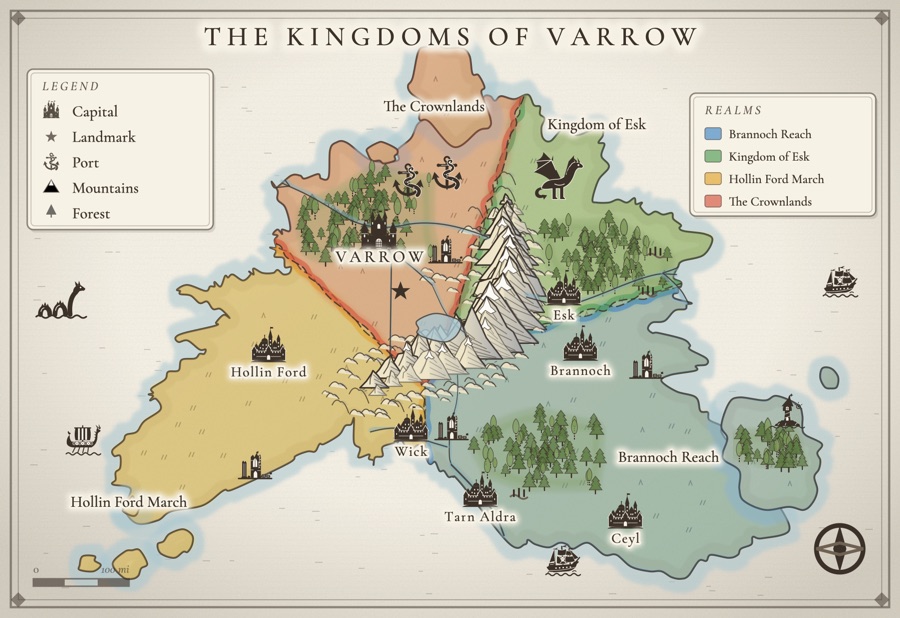
Maps that look like the ones in the front of your favorite books.
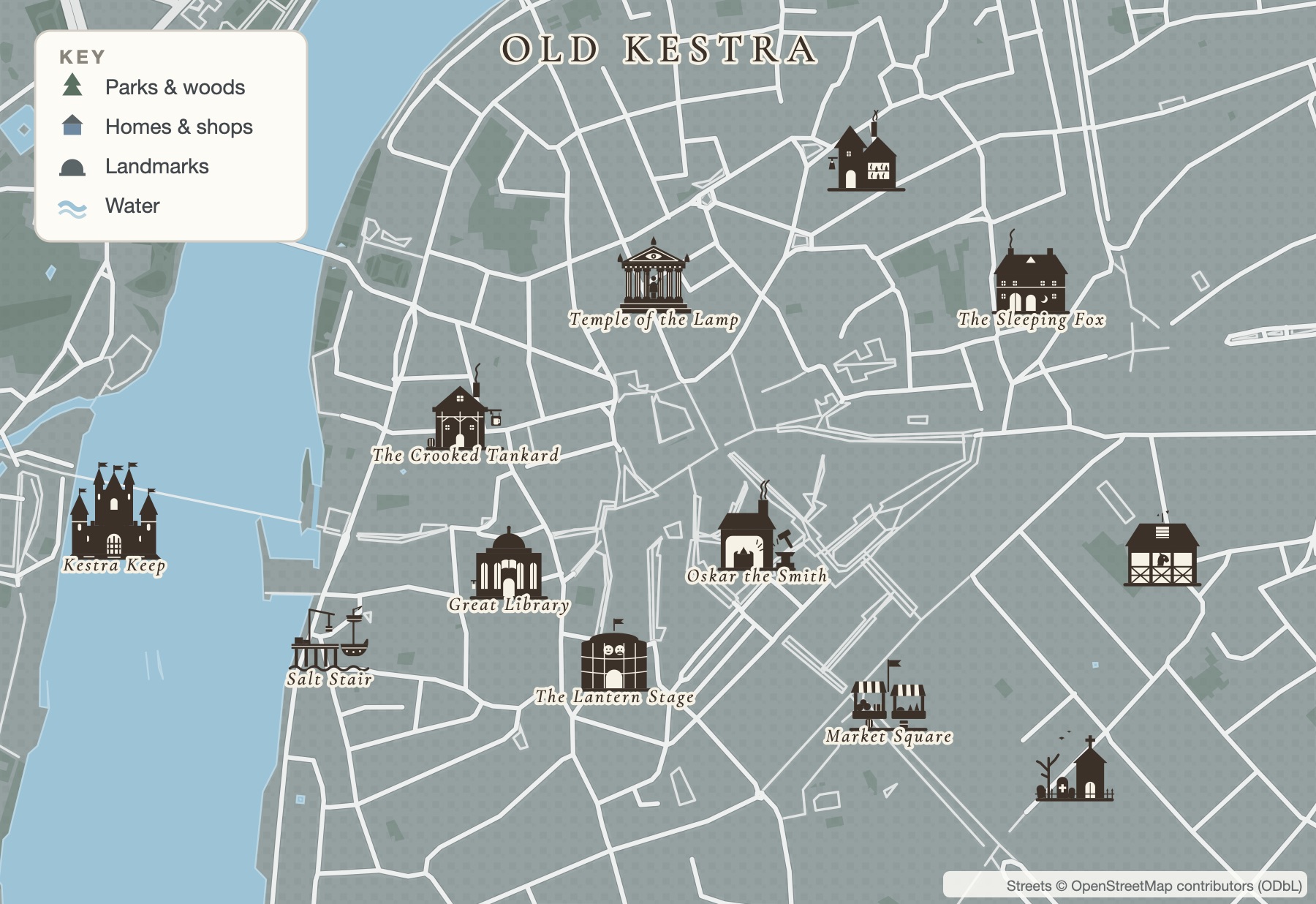
Every castle, tavern and temple is hand-drawn in one bold ink style, so your map reads like an atlas plate, not clip art. Carve the land into realms with colored borders you can redraw or split. Put a dragon over the mountains and a sea serpent off the coast. Or start from the real streets of Prague, Lisbon or Kyoto and fill them with restaurants, a city hall and parks (or flip to a fantasy town of taverns and keeps).
- Over 30 buildings, plus dragons, krakens, galleons and longships
- Realms, dunes, jungle, marsh and snowfields in real colors
- Roads that find their own way between your towns
- Pull a map from your draft, or draw it line by line
Running a D&D campaign or playing in one? See how tables use Inkling for backstories, NPCs, session recaps and the world map.
Your story already has a map.
Press one button and Inkling finds every town, river and castle your story names, shows which chapters they appear in, and helps you set them on your map. Write another chapter, check again, and the new places are waiting.
- Draw your world in one tap, or start from your own story.
- Name your places, or let your chapters name them for you.
- Write what happens there, with the map, your characters and your notes beside the page.
Inkling only reads your story when you press the button, and it never writes a word of it.
A quick tour of your studio
See the shape of the thing
Drop a card for every scene, character, place, and idea. Drag them into order. Draw the threads between them. It’s the corkboard wall in your head, finally out where you can see it.
- Scene, character, place, idea & map cards
- Drag anywhere, then link them into a storyline
- A board for every project or story
what if it’s burning through her?
cliffside eyrie, always on fire
dragon-rider, haunted
her first flight over the Aerie
Four steps, then you're writing.
Start writing in Inkling's own editor; every word saves to your account as you type. Already drafting in Google Docs? Connect a Doc, one file at a time, or paste your draft in.
Every story lands on your shelf with its own cover and a “Previously…” recap waiting.
Sketch the whole story on a mind map, build your characters, and draw living maps of your world. Every favorite tool, right beside your writing.
Open whichever story calls to you, or let Inkling choose. Tap “I have 15 min” or “Surprise me” and it drops you straight in. Your words stay right here, or in your connected Google Doc.
Never lose the thread again.
Come back after a week, or a month, and Inkling hands you a one-paragraph “Previously…” of your own words. You’re back inside the story in seconds, not paragraphs. No rereading, no “where was I,” no lost momentum.
- A recap waiting every time you open a story
- Built from your prose, never invented
- Turn it off and Inkling is a pure organizer
The lighthouse keeper finally read the last letter, and learned the comet wouldn’t pass again in her lifetime. She left the lamp burning anyway, and walked down to the water.
Stop juggling five different apps.
Most tools give you a slice: an editor, or a reference library, or a mood board. Inkling gives you the whole desk, so your writing life stops living in a dozen browser tabs.
- Library & shelfEvery piece gathered on one cover-lined shelf.
- Projects & chaptersBind a novel into ordered chapters, each recapped.
- StatusesDrafting, resting, or in need of an ending. See it all at a glance.
- Submissions trackerWhere you sent each piece, and what came back.
- Storyboard canvasScenes, characters, places & ideas, drawn into a storyline.
- Character builderWound, lie, want, need, and a woven arc.
- Realm & city mapsCastles, dragons and colored realms, or a city on real streets.
- Muse & ideas boardA prompt, a title, a whole mood when you’re stuck.
- House-style coversA warm cover for every story, or upload your own.
- Art boardSketch a cover or a scene in a style you choose.
- Palettes, fonts & dark modeEight weathered palettes, light or dark.
- Invite-only peer reviewFriends add their name, read the whole piece, and send you a note, no account needed.
- Export & printPrint your story, or export clean Word or text.
- “Previously…” recapsYour own words, waiting every time you return.
I built Inkling for my wife, who is dealing with burnout from her corporate job. She is an incredible writer and can paint a picture or drop you completely into a scene. Truly, she’s the most talented writer I know, but she never gets to write anything meaningful in her professional life and finds a lot of joy in writing on weekends or late at night to take her mind off the hundred tasks piling up at work. After watching her write in notebooks, sometimes on her laptop, and other times in old folders she has carried with her for years, I asked how she felt about putting everything in one place.
What began as a project between my wife and me turned into something so much bigger that I wanted to share it with other hobby writers, aspiring authors, and anyone looking for a creative outlet beyond social media. Fair warning: I’m a romantasy nerd to my core, so Inkling might lean a little swoony and a little dragon-filled. Every genre is just as welcome, though, from cozy mystery to memoir to hard sci-fi. Yes, there is AI here, but trust me, I’ve heard it from my wife loud and clear: AI is never there to write your stories. It is only there to support your process. So, go write, have fun, and write us if you can think of a way to make this bigger and better. My goal is to help you. Help you unwind. Help you step away from the pull of social media and be creative in a world full of noise. Get lost in your stories again.
Really, write us: hello@inkling.digital
Your desk, your colors, light or dark.
Eight quiet, weathered palettes, each with a warm light and a soft dark. Tap one and watch the whole place change. Inkling remembers.
The promiseA generator that never writes your story.
This is the line we won’t cross. Recaps summarize your words. Covers are art, not text. Switch the generator off entirely and Inkling is simply the best place to keep all your writing together. The sentences are always, only, yours.
One plan, priced like a paperback.
Take 14 days to experience the full writing desk, build worlds, and be creative, no card required. Keep going for $9 a month, and your work is never deleted, ever, even if you pause.
- The full writing desk, free for 14 days
- Up to 3 stories, plus storyboards & characters
- Recaps, covers & Muse sparks, plus two maps
- Peer review, export & print your story
- No credit card to begin
- After 14 days: export to Google Docs anytime; Plus keeps you writing
- Unlimited kept maps, realms and cities
- Unlimited print-quality SVG and PNG downloads, no Inkling credit
- Twelve cities on real streets, plus a city map for every town
- Every layout, creature, style pack and layer
- Your writing desk stays read-only; Plus opens it
- Unlimited stories on your shelf
- Storyboard, Character builder & world maps
- Automatic, always-fresh “Previously…” recaps
- 5 generated covers a month, plus unlimited maps & Muse sparks
- Voice capture & dictation
- Export & print your story
- Every palette, font & light/dark
- Invite-only peer review
- Everything in Plus
- $72/year - your price never rises
- Founding badge on your shelf
- A private founders’ channel
- Direct line to shape the roadmap
The questions writers actually ask.
Do I have to move my writing?
Nope. Write in Inkling’s own editor, or connect a Google Doc you already write in, one file at a time. Have a draft somewhere else? Paste it in or choose a .txt or .md file on your first page, and a draft with chapter headings comes in split into chapters. It’s entirely up to you.
Does anything write for me?
No. Your story and every sentence in it are always yours. Inkling can recap what you’ve already written and help you create covers, maps, and character arcs based on your choices, but it will never generate your prose. You can also turn these features off completely and use Inkling purely as an organizer.
What happens after my free trial?
You’ll have 14 days to explore everything Inkling offers, with no credit card required. During the trial you can keep up to 3 stories and 2 maps. After that, subscribe to keep writing. If you decide not to, your work stays safe in your account and you can export it to Google Docs anytime. We won’t delete your work.
Does it work on my phone and computer?
Yes. You can use Inkling on your phone or computer, and everything stays synced. You can also install it as an app on your phone or keep it in your desktop dock, so it’s easy to return whenever you have a few minutes to write.
Is my work private?
Yes. Your stories belong to you and remain private unless you choose to share them. If you invite someone to read a story, they’ll only see that specific story, not the rest of your library, notes, or works in progress.
Can I cancel anytime?
Yes. Plus is month to month, and yearly plans renew yearly. You can cancel directly from Setup without having to contact anyone. Anything you write in Google Docs will remain there, and the work stored in Inkling stays safely in your account, ready to export to Google Docs.
Your world is waiting.
Draw it, name every place in it, then write what happens there. The stories you’ve already started can come too.
Free for 14 days · no credit card · cancel anytime.