The Inkarnate alternative for writers who want the map beside the book
Inkarnate is a wonderful, deep map art tool, and if the map is your project, it is hard to beat. If the book is your project, Inkling keeps a simpler map maker right beside your manuscript, characters and storyboard, in one bold ink style, so you spend your evening deciding where the river runs instead of painting it.
| Inkling | Inkarnate | |
|---|---|---|
| What it is | A writing app with a map maker built in. Your realm and city maps sit in the same project as your draft, your characters and your storyboard. | A dedicated map art tool in the browser, and a very deep one: world, regional, city and battle maps, all made inside Inkarnate. |
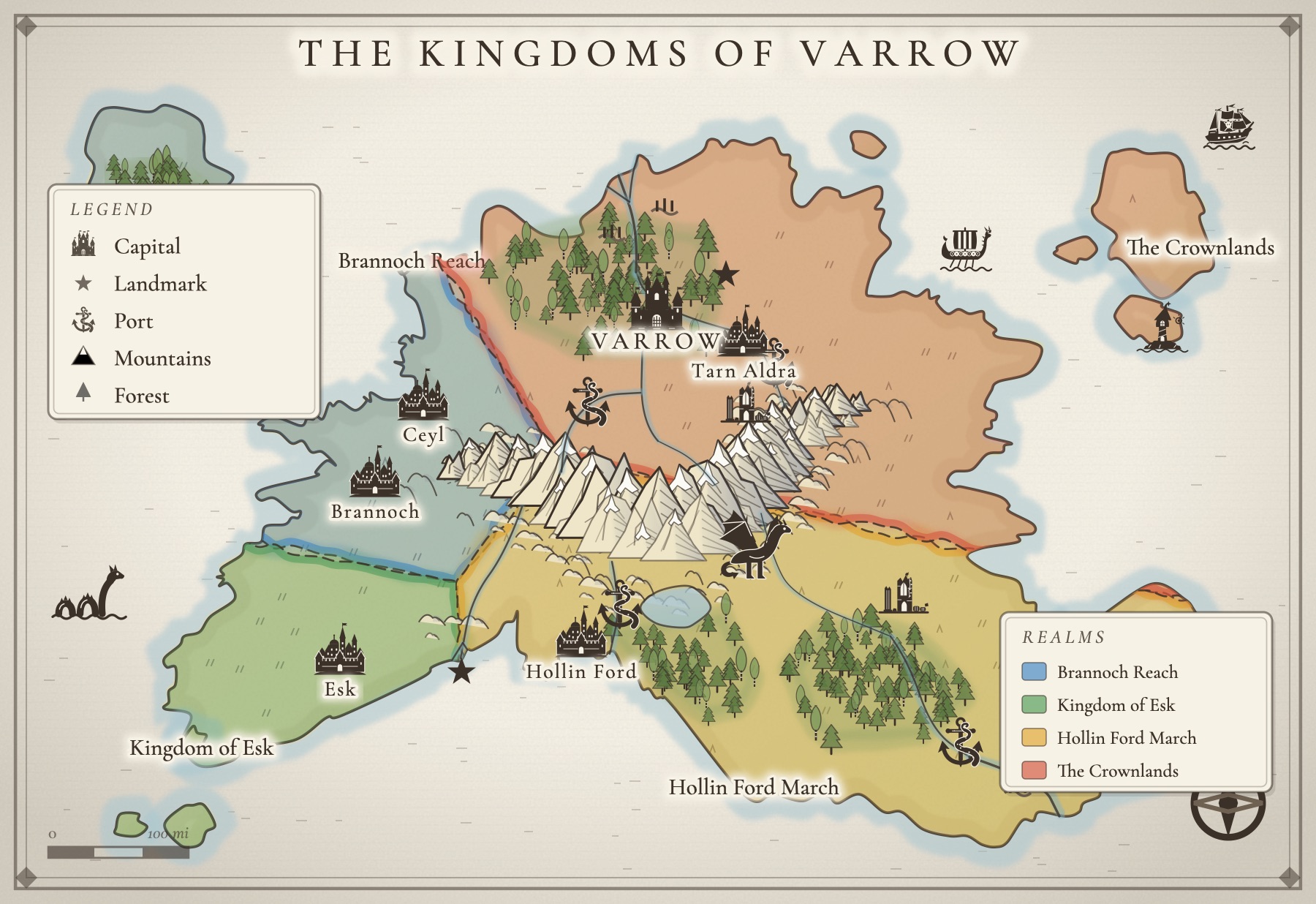
| How you make a map | You decide, it draws. Start from a ready-made layout, stamp in places, carve realms with colored borders, paint terrain, and let roads find their own way around mountains and water. | You paint. Textures, stamps, layers, and line and shape tools give you fine artistic control that rewards the hours you put in. |
| The art | One family of stamps in one bold ink style, from castles and taverns to dragons and sea serpents. Every stamp re-inks itself to match the style you choose. | A huge library across many art styles: over 30,000 assets on its paid plans and about 1,000 on the free plan, plus your own custom assets. |
| Styles | Three house styles: Inkling Wash and Copperplate to start, and Gilded Night with a Map Pass. | Many art styles and packs, each with its own look, which you can mix as you like. |
| City maps | Twelve real-world street plans with the names stripped off so they become yours (four to start). With a Map Pass, any town on your world map opens into its own city map. | City assets and styles for drawing a city building by building, exactly as you picture it. |
| Battle maps | Not offered. Inkling is built for the world and city maps a story needs. | Yes: battle map art packs, plus export for virtual tabletops on its paid plans. |
| Community | Small and quiet on purpose. The map is for your book, not a gallery. | A big, generous community: more than 16 million maps made, and over 237,000 you can clone and adapt. |
| From map to manuscript | Press “Write a story here” and a new story opens, set on your map, with the places you named already in its notes. | Not a writing tool. You export the map and write somewhere else. |
| Export size | A PNG download to start. Print and poster sizes and SVG come with a Map Pass. | Up to 2K on the free plan, 8K on Creator and 16K (in beta) on Studio. Far larger than most books need, and lovely for big prints. |
| Pricing | Free to start: keep two maps and download two, with a small Inkling credit. A Map Pass is $29 a year (or $4 a month). The full writing desk, Inkling Plus, is $9 a month. | A free Hobby plan with 3 maps and 2K export. Creator is $39.99 a year or $7.99 a month; Studio is $79.99 a year or $14.99 a month. Prices as listed on inkarnate.com in October 2026; check their site for current pricing. |
Honestly, Inkarnate is the deeper art tool
Let us say it plainly. Inkarnate has a far bigger art library, painterly control over every texture and edge, battle maps for the table, enormous exports, and a community that has made millions of maps you can learn from. If you love the craft of map art itself, or you are making a map to frame, it is a superb choice and we will not pretend otherwise. Inkling's map maker is smaller on purpose.
The map lives where the book lives
Inkling is a writing app first. Your maps sit in the same project as your draft, your cast and your storyboard, so checking which way the river runs takes one click, not a trip to another tab, another login and another export. A map you can see while you write is a map that actually keeps the story consistent.
Decide, don't paint
Every stamp in Inkling is drawn in one bold ink style, so the castle, the tavern and the sea serpent always look like the same hand made them. You choose a style, Inkling Wash, Copperplate or Gilded Night, and every stamp re-inks itself to match. There is no way to end up with a map that looks pasted together from five art packs, and no hour lost to choosing between forty kinds of pine tree.
Cities on real streets
Start a city map from the real street plan of a place like Prague, Lisbon, Edinburgh or Kyoto, with the names stripped away so it becomes your city. Real streets have the crooked logic that makes a place feel lived in, and you skip drawing a street grid by hand. With a Map Pass, any town on your world map opens into its own city map, already named.
From the map straight to chapter one
When a place on your map starts whispering, press Write a story here. A new story opens, set on that map, with the places you named in its notes and a few opening questions to get you going. The map becomes the first page, not a picture you made instead of writing.
Which one should you pick?
If the map is the project, for a game, a print or a battle at the table, pick Inkarnate. If the map serves a story you are writing and you want it beside the draft, try Inkling. Plenty of writers will happily use both: Inkling while drafting, and Inkarnate when it is time to make a showpiece for the wall.
All of it. In one place.
This isn't five apps stitched together. Your storyboard, your cast, your maps, your covers, and the story itself all live on one desk, right beside the words. Nothing to sync between tools. No five separate subscriptions. Just everything a writer needs, finally in the same place.
Your whole writing desk, in one place
Start free today. Bring one story in, and see how much lighter it feels with everything beside it.